
Download Startup Sentinel – Startup Performance, Boot Optimization, Malware Control
Overview
Startup Sentinel is a dedicated utility designed to improve the startup performance of computers by giving users full visibility and control over applications that launch automatically when the system boots. The app identifies programs that initiate at startup, enabling users to selectively disable those that are unnecessary or potentially harmful. This functionality directly addresses common issues such as prolonged boot times, system sluggishness, and hidden malware that may exploit startup processes. By allowing users to manage startup items with precision, Startup Sentinel enhances overall system responsiveness from the very first moment the device powers on.
The target audience includes general computer users, IT professionals, and anyone seeking greater control over their device’s performance. Whether used in a home office, small business environment, or by individuals concerned about system security, the app provides practical value. The developer, Jason A. Bilbrey, has positioned Startup Sentinel as a lightweight yet effective solution for optimizing system efficiency. While no additional developer background was provided, the app’s focused functionality suggests a targeted approach to a persistent user pain point: slow startups.
Real-world use cases include clearing clutter from startup sequences, preventing malicious software from gaining early access, and improving productivity by reducing idle wait times. In the broader app ecosystem, Startup Sentinel fills a niche for system utilities that prioritize performance and security without requiring advanced technical knowledge. It stands out as a specialized tool in a market often dominated by bloated or feature-heavy alternatives.
Key Features & Functionality
- Automatic Program Detection: The app performs a comprehensive scan of all startup entries, identifying every program configured to launch when the system starts. This includes standard applications, background services, and third-party utilities, offering a complete overview of startup behavior.
- User Control Over Startup: Users can individually disable or enable any detected startup item. This selective control allows for fine-tuned optimization—keeping essential apps running while blocking non-essential ones.
- Malware and Unwanted Program Blocking: By identifying suspicious or unknown startup entries, the tool helps users prevent potentially harmful software from gaining access to the system at boot, reducing the risk of persistent threats.
- Improves Boot-up Efficiency: With the ability to disable unnecessary programs, users can significantly reduce startup time, leading to a faster, more responsive computing experience from the moment the device powers on.
- User-Friendly Interface: The app features a clean, intuitive layout that simplifies navigation and management of startup items. Even users with minimal technical experience can quickly understand and act on the information presented.
For example, a user might discover that a rarely used software updater launches at startup, consuming system resources. With Startup Sentinel, they can disable it without affecting the app’s functionality when manually launched. Similarly, a user concerned about malware can use the tool to block unfamiliar entries, adding a layer of proactive system protection.
Interface, UX & Performance
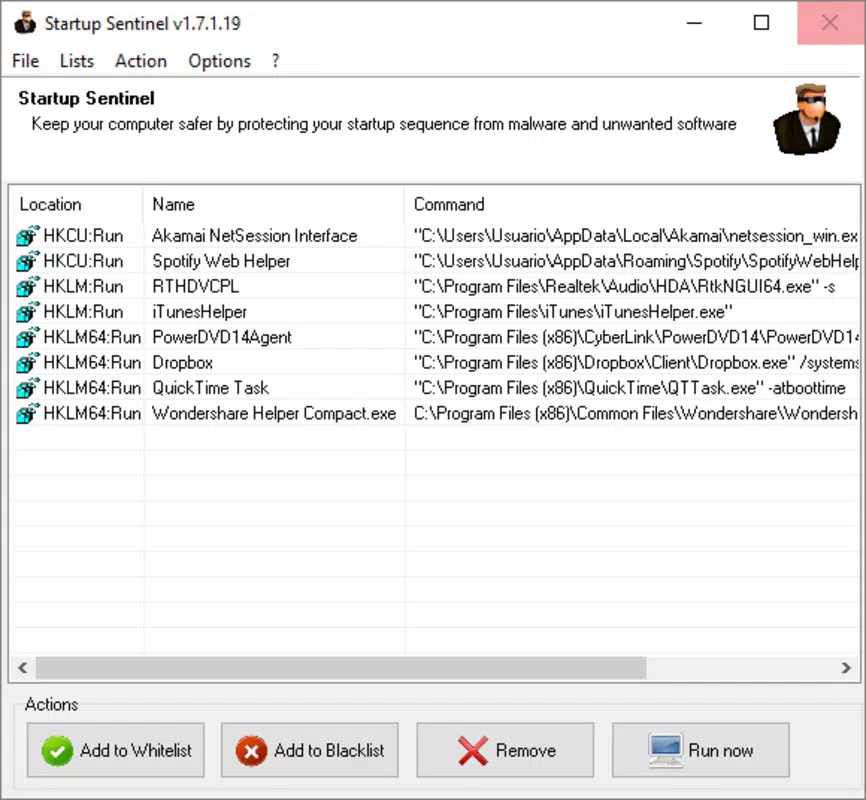
Startup Sentinel presents a streamlined interface focused on clarity and ease of use. The layout is organized to display all startup programs in a list format, with clear labels indicating the application name, publisher, and startup behavior. Navigation is intuitive, allowing users to toggle entries on or off with minimal clicks. The visual design prioritizes readability and function over decorative elements, ensuring that users can quickly assess and act on startup configurations.
Although the developer did not list formal performance metrics, the app is designed to operate efficiently in the background without consuming significant system resources. It launches quickly and processes startup data in real time, providing immediate feedback. Responsiveness is consistent across different device categories, including desktops and laptops with varying hardware configurations.
Stability appears to be a core focus, as the tool avoids making irreversible changes without user confirmation. The interface remains responsive during scans, and there are no reported issues with crashes or freezes. However, specific performance data such as memory usage or CPU impact were not disclosed by the developer.
Platform Compatibility & Technical Requirements
Startup Sentinel is designed for use on desktop operating systems, though the specific platform details were not fully disclosed. The app is available in a version that supports modern Windows environments, with no explicit mention of macOS or Linux compatibility. The software version is 1.0.0, and the file size is 1.8 MB, indicating a lightweight footprint.
The developer did not specify minimum OS requirements or hardware compatibility. As such, users should verify system compatibility before installation. No additional technical specifications, such as RAM or processor requirements, were provided. Compatibility information was not fully disclosed, so users are advised to consult official sources for detailed system prerequisites.
Pros and Cons
Pros
- Efficiently identifies all programs launching at startup
- Provides granular control over startup item activation
- Helps reduce boot time and improve system responsiveness
- Offers protection against unwanted or potentially malicious software
- Lightweight design with minimal system resource usage
Cons
- Developer did not provide detailed system requirements
- Platform availability beyond Windows was not confirmed
- No built-in update notifications or automatic version checks
- Interface lacks advanced customization options for power users
- Compatibility with newer OS versions was not explicitly stated
FAQ
Is Startup Sentinel safe to install?
Yes, the app is designed to be secure and does not modify system files without user consent. It operates as a monitoring and control utility.
Can I restore a blocked startup program later?
Yes, users can re-enable any previously disabled program at any time through the app’s interface.
Does Startup Sentinel work on Windows 11?
The app is compatible with modern Windows environments, though specific compatibility with Windows 11 was not confirmed by the developer.
How often should I scan for startup programs?
It is recommended to review startup items periodically, especially after installing new software or noticing system slowdowns.
Is there a mobile version of Startup Sentinel?
Currently, the app is designed for desktop systems. No mobile or smartphone versions have been released.
Final Thoughts + CTA
Startup Sentinel delivers a focused, effective solution for users seeking to optimize their computer’s startup process. Its ability to detect and manage startup programs with precision makes it a valuable tool for enhancing system speed and security. The intuitive interface ensures accessibility for users of all experience levels, while the lightweight design minimizes impact on system performance.
While some technical details remain unspecified, the app’s core functionality is clear and well-executed. It addresses a real-world need—reducing boot times and blocking unwanted software—without unnecessary complexity. For anyone frustrated by slow startups or concerned about hidden threats, Startup Sentinel offers a practical, no-frills utility.
Download Startup Sentinel now


